The athenahealth patient portal is designed to support patient-centered care by providing a direct line of communication with care teams and quick access to health and clinical information.
If you have already created a Tryon Patient Portal account but are unable to log in due to a forgotten password, follow these steps to reset it and regain access to your portal:
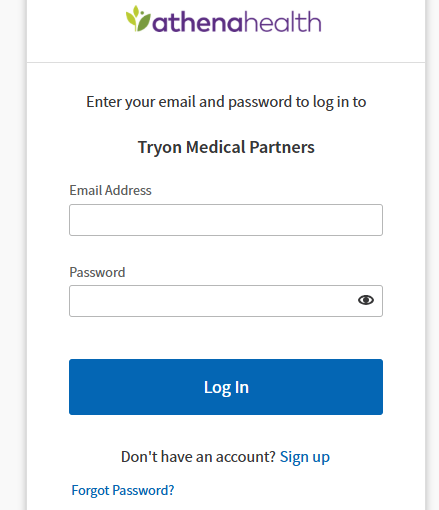
- Go to the Tryon patient portal welcome page
- Click on the ‘Forgot your password?’ link below the ‘Log in with athenahealth’ button
- Follow the instructions displayed on the screen to reset your password
- If you still experience issues, contact your healthcare provider’s office to request a password reset email.
Tips to Safeguard Your Tryon Patient Portal Account
The Tryon Patient portal provides convenient access to your health information, but protecting your account is crucial for maintaining privacy and security. Here are practical steps to keep your portal secure.
Use Strong, Unique Passwords
Create a strong password that combines uppercase and lowercase letters, numbers, and symbols. Avoid using easily guessable information like birthdays or names.
Never reuse passwords from other accounts. Consider using a reputable password manager to generate and store complex passwords securely.
Enable Two-Factor Authentication (2FA)
If your patient portal offers two-factor authentication, enable it immediately. 2FA adds an extra layer of security by requiring a second form of verification—such as a code sent to your phone—in addition to your password.
Monitor Account Activity Regularly
Regularly review your account activity and medical records for any unauthorized changes or access. Most portals provide login history or activity logs. Report any suspicious activity to your healthcare provider immediately. Prompt reporting can prevent potential misuse of your information.
Protect Your Login Credentials
Never share your username, password, or security questions with anyone, including family members. Healthcare providers will never ask for your password via email or phone.
Be wary of phishing attempts—legitimate communications from your provider will typically address you by name and won’t request sensitive login information.
Keep Contact Information Current
Ensure your email address and phone number on file are up-to-date. This ensures you receive important security notifications and can recover your account if needed. Update this information promptly if it changes.
By implementing these security practices, you can confidently use your patient portal while protecting your sensitive health information from unauthorized access.
